今天startx,找了半天“rpm软件包管理器”,居然没有找到,本想就此作罢,但总觉得不爽,于是乎google,原来在kde下叫作kpackage,一查居然没有装,肯定不可能啊,于是再google,原来现在叫redhat-config-packages(这么长…),于是乎启动,当我看到他标题栏上字的时候,我彻底晕倒了,只见上书六个大字:
“添加/删除程序”
Telnet your heart…
探寻IT相关技术,希望能以小见大…
今天startx,找了半天“rpm软件包管理器”,居然没有找到,本想就此作罢,但总觉得不爽,于是乎google,原来在kde下叫作kpackage,一查居然没有装,肯定不可能啊,于是再google,原来现在叫redhat-config-packages(这么长…),于是乎启动,当我看到他标题栏上字的时候,我彻底晕倒了,只见上书六个大字:
“添加/删除程序”
大家都知道,Linux下用源码包安装软件,一般会用到./configure命令,其后经常跟很多参数,但是安装完后:
1、忘掉参数;
2、本身就不是你装的;
这下若想查出参数就够你受的了:(
虽然现在还没有想到什么解决的办法,不过今天在QQ上问了问小林子倒是有一个解决部分参数问题的办法,现总结如下:
参数限制
一般为查询是否加载某模块,本例为mod_so.c
方法
原来使用过文件倾印工具的会比较熟悉一点,(例如原来在borland的C++ Builder下的TDump)
实际上objdump就是Linux下的文件倾印工具
$objdump -T /path/httpd | grep so
…
080920a0 g DO .data 00000038 Base so_module
…
可见,–with-module-so
BTW
谁能告诉我196的apache是谁装的?我吗?你吗?实在记不得了,想问他/我几个问题!!!
# DO NOT EDIT THIS FILE! It was created by Ethereal
@[email protected] eq 80 or tcp.port eq 443@[22328,55704,24713][65083,65535,42083]
@[email protected] eq 53 or udp.port eq 53@[63477,65535,101][0,32767,0]
@Bad [email protected] or icmp@[0,0,0][57311,25186,25957]
@Microsoft@smb or nbns@[0,5080,65535][65535,65535,65535]
@IPX@ipx@[60652,0,1542][65535,65535,65535]
@DHCP@bootp@[39064,15934,40863][65535,65535,65535]
@Intel ANS probes@ans@[56173,56173,56173][0,0,0]
@Background Noise@stp or arp or eth.dst eq ff:ff:ff:ff:ff:ff@[65535,65535,65535][26214,26214,26214]

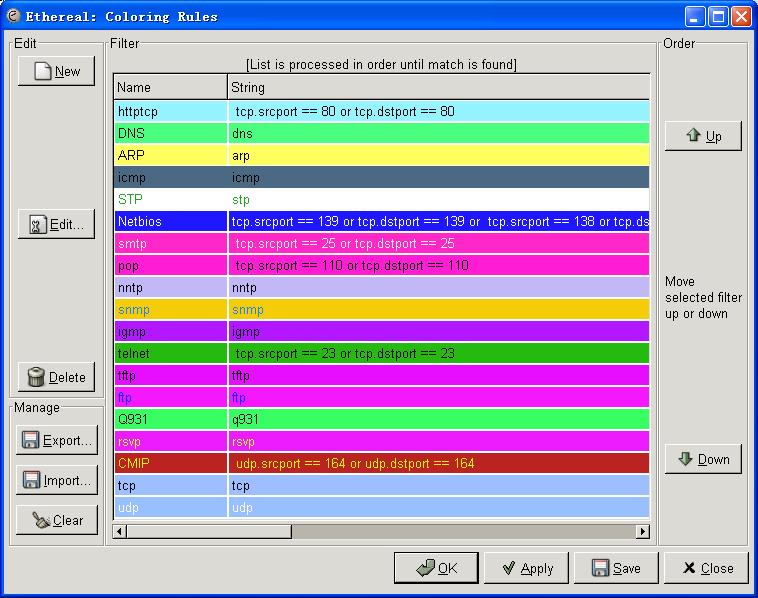
# DO NOT EDIT THIS FILE! It was created by Ethereal
@httptcp@ tcp.srcport == 80 or tcp.dstport == 80@[38385,62683,65534][0,0,0]
@DNS@dns@[19194,65534,32100][0,0,0]
@ARP@arp@[65202,65533,24456][0,0,0]
@icmp@icmp@[65534,8609,6712][0,0,0]
@STP@stp@[65534,65534,65534][8262,42200,9408]
@[email protected] == 139 or tcp.dstport == 139 or tcp.srcport == 138 or tcp.dstport == 138 or tcp.srcport == 137 or tcp.dstport == 137 or udp.srcport == 139 or udp.dstport == 139 or udp.srcport == 138 or udp.dstport == 138 or udp.srcport == 137 or udp.dstport == 137@[7961,5947,65534][64045,65535,62556]
@smtp@ tcp.srcport == 25 or tcp.dstport == 25@[65534,10208,51170][62059,62059,62059]
@pop@ tcp.srcport == 110 or tcp.dstport == 110@[65534,7268,54440][0,0,0]
@nntp@nntp@[49886,47154,63549][992,992,992]
@snmp@snmp@[62556,52730,2142][7636,32644,64045]
@igmp@igmp@[45944,5999,65534][0,0,0]
@telnet@ tcp.srcport == 23 or tcp.dstport == 23@[9274,47661,3862][0,0,0]
@tftp@tftp@[59220,3637,65534][0,0,0]
@ftp@ftp@[62721,6393,65534][0,13490,65038]
@Q931@q931@[14275,65534,25039][0,0,0]
@rsvp@rsvp@[60324,7655,65534][63348,65535,9481]
@CMIP@ udp.srcport == 164 or udp.dstport == 164@[47957,9122,9122][60977,63600,0]
@tcp@tcp@[40555,49091,65534][0,0,0]
@udp@udp@[39040,49264,65534][64542,64542,64542]
# DO NOT EDIT THIS FILE! It was created by Ethereal
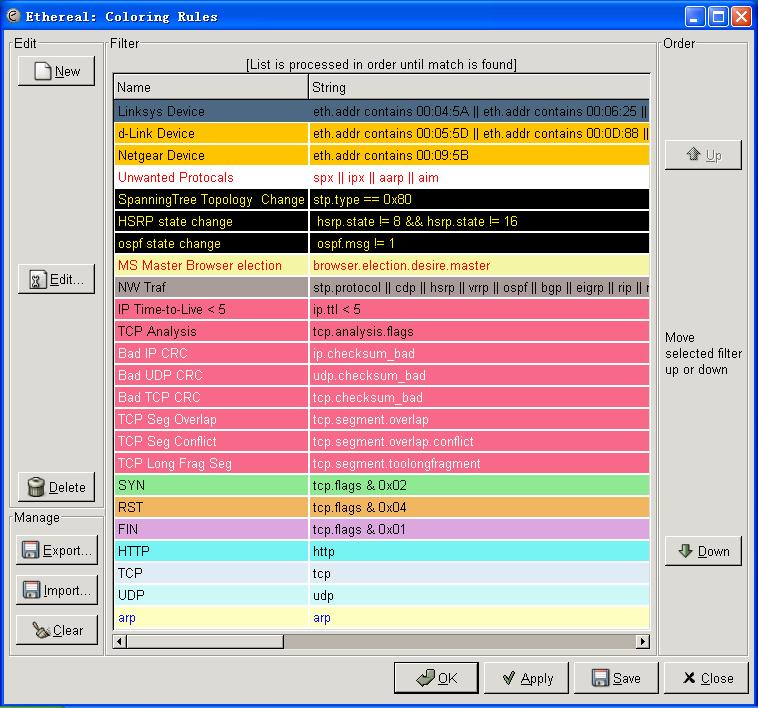
@Linksys [email protected] contains 00:04:5A || eth.addr contains 00:06:25 || eth.addr contains 00:0C:41 || eth.addr contains 00:0F:66@[65535,50372,0][0,0,0]
@d-Link [email protected] contains 00:05:5D || eth.addr contains 00:0D:88 || eth.addr contains 00:0F:3D || eth.addr contains 00:00:50:BA || eth.addr contains 00:80:C8@[65535,50372,0][0,0,0]
@Netgear [email protected] contains 00:09:5B@[65535,50372,0][0,0,0]
@Unwanted Protocals@spx || ipx || aarp || aim@[65535,65535,65535][65535,0,0]
@SpanningTree Topology [email protected] == 0x80@[0,0,0][65535,63222,0]
@HSRP state change@ hsrp.state != 8 && hsrp.state != 16@[0,0,0][65535,63222,0]
@ospf state change@ ospf.msg != 1@[0,0,0][65535,63222,0]
@MS Master Browser [email protected]@[62965,63222,42148][65535,0,0]
@NW [email protected] || cdp || hsrp || vrrp || ospf || bgp || eigrp || rip || rtmp || eth.addr == 01:00:0c:cc:cc:cc@[43573,39932,39932][0,0,0]
@IP Time-to-Live < [email protected] < 5@[63736,26728,34952][0,0,0]
@TCP [email protected]@[63736,26728,34952][0,0,0]
@Bad IP [email protected]_bad@[63736,26728,34952][65535,65535,65535]
@Bad UDP [email protected]_bad@[63736,26728,34952][65535,65535,65535]
@Bad TCP [email protected]_bad@[63736,26728,34952][65535,65535,65535]
@TCP Seg [email protected]@[63736,26728,34952][65535,65535,65535]
@TCP Seg [email protected]@[63736,26728,34952][65535,65535,65535]
@TCP Long Frag [email protected]@[63736,26728,34952][65535,65535,65535]
@[email protected] & 0x02@[36663,59478,37540][607,3474,607]
@[email protected] & 0x04@[61717,47055,24609][0,0,0]
@[email protected] & 0x01@[56433,42925,57086][0,0,0]
@HTTP@http@[30428,62589,62589][0,0,0]
@TCP@tcp@[57455,60592,62451][0,0,0]
@UDP@udp@[52264,63736,63736][0,0,0]
@arp@arp@[65140,65535,49151][0,2987,65535]
选一款喜欢的,然后开始绚色生活吧!
不过要是阿梅能帮忙配配色就更好了,呵呵!(题外)
rt…
不废话了,看图!
图一
不说iptable,至少apache要加入限制,防止从网站疯狂下载。

图二
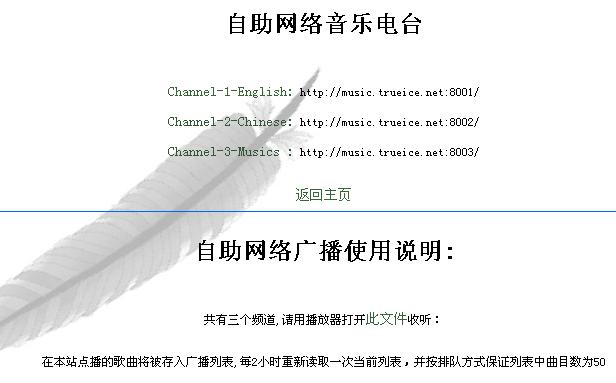
流媒体服务,最近正在做,只不过这里用的streamcast
图三
图四
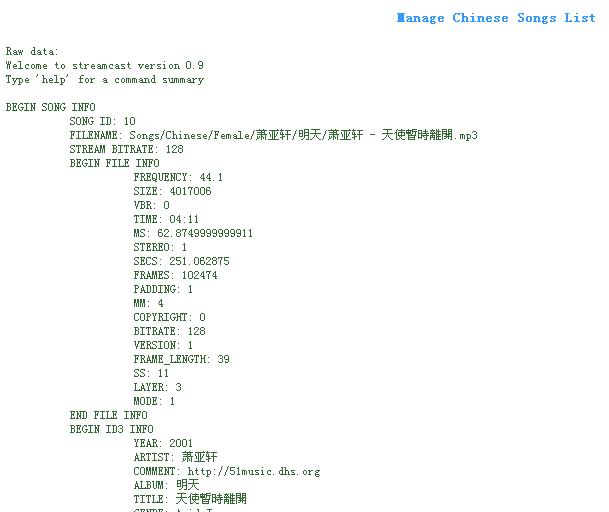
图五

[问题描述]
下面是在我的本本上面截下来的NetworkAdapter的信息(此时,所有网络连接均disable,除了vmware的虚拟网卡vmnet1、vmnet8),现在的问题是想要从中选出网卡(在本例中为1、4、13、14)而排除其他,具体选择下面哪个信息或者使用其他更好的方式进行识别。
[初步设想]
下面为我倾向的字段:
SettingID:编号应该有所区别,不过不懂:(
NetConnectionStatus:从本例中似乎最为合适,不为Null的刚好就是我想选定的网卡。
PNPDeviceID:PCI的似乎就满足要求了(vmware 的就不管了,肯定要单独讨论,要不就弄乱了,呵呵),不过不知集成在主板上面的网卡此项为什么,我不知我本本的网卡是否算集成在主板上:(
但以上方式怎么看都不规范,说不定会有误识别的发生,不知正规的识别方式为什么,才能保证无误!知道的赐教哦!不胜感激!
1:
Caption:[00000001] Intel(R) PRO/100 VE Network Connection
Description:Intel(R) PRO/100 VE Network Connection
IPEnabled:False
ServiceName:E100B
SettingID:{50879C82-B876-444B-B041-FC34E733D43E}
MACAddress:
IPAddress:
AdapterType:
Availability:3
ConfigManagerErrorCode:22
ConfigManagerUserConfig:False
Manufacturer:Intel
Name:Intel(R) PRO/100 VE Network Connection
NetConnectionStatus:0
PermanentAddress:
Status:
StatusInfo:
ProductName:Intel(R) PRO/100 VE Network Connection
PNPDeviceID:PCIVEN_8086&DEV_103D&SUBSYS_05221014&REV_814&39A85202&0&40F0
2:
Caption:[00000002] 数据包计划程序微型端口
Description:数据包计划程序微型端口
IPEnabled:False
ServiceName:
SettingID:{33165690-0E0C-4A97-844F-F99948C887C2}
MACAddress:
IPAddress:
AdapterType:
Availability:3
ConfigManagerErrorCode:0
ConfigManagerUserConfig:False
Manufacturer:Microsoft
Name:数据包计划程序微型端口
NetConnectionStatus:
PermanentAddress:
Status:
StatusInfo:
ProductName:数据包计划程序微型端口
PNPDeviceID:ROOTMS_PSCHEDMP000
3:
Caption:[00000003] RAS 同步适配器
Description:RAS 同步适配器
IPEnabled:False
ServiceName:AsyncMac
SettingID:{C344A14C-B778-44CC-8D27-8D09E6F93B80}
MACAddress:20:41:53:59:4E:FF
IPAddress:
AdapterType:广域网 (WAN)
Availability:3
ConfigManagerErrorCode:0
ConfigManagerUserConfig:False
Manufacturer:Microsoft
Name:RAS 同步适配器
NetConnectionStatus:
PermanentAddress:
Status:
StatusInfo:
ProductName:RAS 同步适配器
PNPDeviceID:SW{EEAB7790-C514-11D1-B42B-00805FC1270E}ASYNCMAC
4:
Caption:[00000004] Intel(R) PRO/Wireless 2200BG Network Connection
Description:Intel(R) PRO/Wireless 2200BG Network Connection
IPEnabled:False
ServiceName:w22n51
SettingID:{325943AD-237B-43FA-BB2F-5BD3A09D79FD}
MACAddress:
IPAddress:
AdapterType:
Availability:3
Connection
ConfigManagerErrorCode:22
ConfigManagerUserConfig:False
Manufacturer:Intel(R) Corporation
Name:Intel(R) PRO/Wireless 2200BG Network Connection
NetConnectionStatus:0
PermanentAddress:
Status:
StatusInfo:
ProductName:Intel(R) PRO/Wireless 2200BG Network Connection
PNPDeviceID:PCIVEN_8086&DEV_4220&SUBSYS_27128086&REV_054&39A85202&0&10F0
5:
Caption:[00000005] WAN 微型端口 (L2TP)
Description:WAN 微型端口 (L2TP)
IPEnabled:False
ServiceName:Rasl2tp
SettingID:{1B53E803-16A3-4F0A-8A9C-5ACCA165935B}
MACAddress:
IPAddress:
AdapterType:
Availability:3
ConfigManagerErrorCode:0
ConfigManagerUserConfig:False
Manufacturer:Microsoft
Name:WAN 微型端口 (L2TP)
NetConnectionStatus:
PermanentAddress:
Status:
StatusInfo:
ProductName:WAN 微型端口 (L2TP)
PNPDeviceID:ROOTMS_L2TPMINIPORT000
6:
Caption:[00000006] WAN 微型端口 (PPTP)
Description:WAN 微型端口 (PPTP)
IPEnabled:False
ServiceName:PptpMiniport
SettingID:{29983E97-B13D-45AA-8697-2A43DAE07E23}
MACAddress:50:50:54:50:30:30
IPAddress:
AdapterType:广域网 (WAN)
Availability:3
ConfigManagerErrorCode:0
ConfigManagerUserConfig:False
Manufacturer:Microsoft
Name:WAN 微型端口 (PPTP)
NetConnectionStatus:
PermanentAddress:
Status:
StatusInfo:
ProductName:WAN 微型端口 (PPTP)
PNPDeviceID:ROOTMS_PPTPMINIPORT000
7:
Caption:[00000007] WAN 微型端口 (PPPOE)
Description:WAN 微型端口 (PPPOE)
IPEnabled:False
ServiceName:RasPppoe
SettingID:{252E9D31-529A-4994-BF9E-D9233F6DE99C}
MACAddress:33:50:6F:45:30:30
IPAddress:
AdapterType:广域网 (WAN)
Availability:3
ConfigManagerErrorCode:0
ConfigManagerUserConfig:False
Manufacturer:Microsoft
Name:WAN 微型端口 (PPPOE)
NetConnectionStatus:
PermanentAddress:
Status:
StatusInfo:
ProductName:WAN 微型端口 (PPPOE)
PNPDeviceID:ROOTMS_PPPOEMINIPORT000
8:
Caption:[00000008] 直接并行
Description:直接并行
IPEnabled:False
ServiceName:Raspti
SettingID:{0EB3A22B-A1F5-4A14-9CE1-6D9E4F513AEB}
MACAddress:
IPAddress:
AdapterType:
Availability:3
ConfigManagerErrorCode:0
ConfigManagerUserConfig:False
Manufacturer:Microsoft
Name:直接并行
NetConnectionStatus:
PermanentAddress:
Status:
StatusInfo:
ProductName:直接并行
PNPDeviceID:ROOTMS_PTIMINIPORT000
9:
Caption:[00000009] WAN 微型端口 (IP)
Description:WAN 微型端口 (IP)
IPEnabled:False
ServiceName:NdisWan
SettingID:{B0DC8F37-A580-42B0-BE2D-E5C53B24B044}
MACAddress:
IPAddress:
AdapterType:
Availability:3
ConfigManagerErrorCode:0
ConfigManagerUserConfig:False
Manufacturer:Microsoft
Name:WAN 微型端口 (IP)
NetConnectionStatus:
PermanentAddress:
Status:
StatusInfo:
ProductName:WAN 微型端口 (IP)
PNPDeviceID:ROOTMS_NDISWANIP000
10:
Caption:[00000010] 数据包计划程序微型端口
Description:数据包计划程序微型端口
IPEnabled:False
ServiceName:
SettingID:{F19F1965-7AB4-4874-A484-6B621C06288A}
MACAddress:3A:DD:20:52:41:53
IPAddress:
AdapterType:Ethernet 802.3
Availability:3
ConfigManagerErrorCode:0
ConfigManagerUserConfig:False
Manufacturer:Microsoft
Name:数据包计划程序微型端口
NetConnectionStatus:
PermanentAddress:
Status:
StatusInfo:
ProductName:数据包计划程序微型端口
PNPDeviceID:ROOTMS_PSCHEDMP001
11:
Caption:[00000011] 数据包计划程序微型端口
Description:数据包计划程序微型端口
IPEnabled:False
ServiceName:
SettingID:{8AD7A9BA-AF20-48B3-9C12-1532946AFE2C}
MACAddress:
IPAddress:
AdapterType:
Availability:3
ConfigManagerErrorCode:0
ConfigManagerUserConfig:False
Manufacturer:Microsoft
Name:数据包计划程序微型端口
NetConnectionStatus:
PermanentAddress:
Status:
StatusInfo:
ProductName:数据包计划程序微型端口
PNPDeviceID:ROOTMS_PSCHEDMP002
12:
Caption:[00000012] WAN 微型端口 (IPX)
Description:WAN 微型端口 (IPX)
IPEnabled:False
ServiceName:NdisWan
SettingID:{ABDDC0A9-E3A3-4169-8511-0576150CB468}
MACAddress:
IPAddress:
AdapterType:
Availability:3
ConfigManagerErrorCode:0
ConfigManagerUserConfig:False
Manufacturer:Microsoft
Name:WAN 微型端口 (IPX)
NetConnectionStatus:
PermanentAddress:
Status:
StatusInfo:
ProductName:WAN 微型端口 (IPX)
PNPDeviceID:ROOTMS_NDISWANIPX000
13:
Caption:[00000013] VMware Virtual Ethernet Adapter for VMnet1
Description:VMware Virtual Ethernet Adapter for VMnet1
IPEnabled:True
ServiceName:VMnetAdapter
SettingID:{A5064ACA-A2D7-46AF-994D-F7D6013A5403}
MACAddress:00:50:56:C0:00:01
IPAddress:System.String[]
AdapterType:Ethernet 802.3
Availability:3
ConfigManagerErrorCode:0
ConfigManagerUserConfig:False
Manufacturer:VMware, Inc.
Name:VMware Virtual Ethernet Adapter for VMnet1
NetConnectionStatus:2
PermanentAddress:
Status:
StatusInfo:
ProductName:VMware Virtual Ethernet Adapter for VMnet1
PNPDeviceID:ROOTVMWARE000
14:
Caption:[00000014] VMware Virtual Ethernet Adapter for VMnet8
Description:VMware Virtual Ethernet Adapter for VMnet8
IPEnabled:True
ServiceName:VMnetAdapter
SettingID:{34421EF5-B6F9-4007-8D20-1AAE83A742D2}
MACAddress:00:50:56:C0:00:08
IPAddress:System.String[]
AdapterType:Ethernet 802.3
Availability:3
ConfigManagerErrorCode:0
ConfigManagerUserConfig:False
Manufacturer:VMware, Inc.
Name:VMware Virtual Ethernet Adapter for VMnet8
NetConnectionStatus:2
PermanentAddress:
Status:
StatusInfo:
ProductName:VMware Virtual Ethernet Adapter for VMnet8
PNPDeviceID:ROOTVMWARE001
1.物理安全
确保每次本机登录服务器后的SignOut过程;设置BIOS密码且修改引导次序禁止从软盘启动系统;
2.使用安全密码
包括对密码长度和密码复杂度的相应要求;
3.限制不必要的用户数量
注意经常检查系统的账号,删除已经不再使用的账号,并注意检查相应账号的权限设置;
4. 口令文件
使用chattr命令给下面的文件加上不可更改属性,防止非授权用户获得权限:
# chattr +i /etc/passwd

# chattr +i /etc/shadow

# chattr +i /etc/group

# chattr +i /etc/gshadow
5. 禁止Ctrl+Alt+Delete重新启动机器命令
修改/etc/inittab文件,将”ca::ctrlaltdel:/sbin/shutdown -t3 -r now”一行注释掉,然后重新设置/etc/rc.d/init.d/目录下所有文件的许可权限:
# chmod -R 700 /etc/rc.d/init.d/*
6. 限制su命令
编辑/etc/pam.d/su文件,增加如下两行:
auth sufficient /lib/security/pam_rootok.so debug
auth required /lib/security/pam_wheel.so group=isd
这时,仅isd组的用户可以用su作为root;
7. 删减登录信息
编辑/etc/rc.d/rc.local将输出系统信息的如下行通通注释掉:
# This will overwrite /etc/issue at every boot. So, make any changes you

# want to make to /etc/issue here or you will lose them when you reboot

# echo "" > /etc/issue

# echo "$R" >> /etc/issue

# echo "Kernel $(uname -r) on $a $(uname -m)" >> /etc/issue

# cp -f /etc/issue /etc/issue.net

# echo >> /etc/issue
然后,进行如下操作:
# rm -f /etc/issue

# rm -f /etc/issue.net

# touch /etc/issue

# touch /etc/issue.net
8.限制NFS访问
应该确保你的/etc/exports具有最严格的访问权限设置,也就是意味着不要使用任何通配符、不允许root写权限并且只能安装为只读文件系统,编辑文件/etc/exports并加入如下两行。
/dir/to/export host1.mydomain.com(ro,root_squash)
/dir/to/export host2.mydomain.com(ro,root_squash)
/dir/to/export 是你想输出的目录,host.mydomain.com是登录这个目录的机器名,ro意味着mount成只读系统,root_squash禁止root写入该目录;
为了使改动生效,运行如下命令:
# /usr/sbin/exportfs –a
9.Inetd设置
首先要确认/etc/inetd.conf的所有者是root,且文件权限设置为600。设置完成后,可以使用”stat”命令进行检查;
# chmod 600 /etc/inetd.conf
然后,编辑/etc/inetd.conf禁止以下服务;
ftp telnet shell login exec talk ntalk imap pop-2 pop-3 finger auth
如果你安装了ssh/scp,也可以禁止掉Telnet/FTP;
为了使改变生效,运行如下命令:
#killall -HUP inetd
请使用TCP_WRAPPERS增强系统安全性,可以修改/etc/hosts.deny和/etc/hosts.allow来增加访问限制;
例如,将/etc/hosts.deny设为”ALL: ALL”可以默认拒绝所有访问;然后在/etc/hosts.allow文件中添加允许的访问;例如,”sshd: 192.168.1.10/255.255.255.0 gate.openarch.com”表示允许IP地址192.168.1.10和主机名gate.openarch.com允许通过SSH连接;
配置完成后,可以用tcpdchk检查:
# tcpdchk
(tcpchk是TCP_Wrapper配置检查工具,它检查你的tcp wrapper配置并报告所有发现的潜在/存在的问题);
10.登录终端设置
/etc/securetty文件指定了允许root登录的tty设备,由/bin/login程序读取,
其格式是一个被允许的名字列表,你可以编辑/etc/securetty且注释掉如下的行;
# tty1

# tty2

# tty3

# tty4

# tty5

# tty6
这时,root仅可在tty1终端登录;
11.避免显示系统和版本信息
可以如下改变/etc/inetd.conf文件:
telnet stream tcp nowait root /usr/sbin/tcpd in.telnetd -h
加-h表示telnet不显示系统信息,而仅仅显示”login:”;
12.阻止ping
在/etc/rc.d/rc.local文件中增加如下一行:
echo 1 >/proc/sys/net/ipv4/

icmp_echo_ignore_all
13.防止IP欺骗
编辑host.conf文件并增加如下几行:
order bind,hosts

multi off

nospoof on
14.防止DoS攻击
对系统所有的用户设置资源限制可以防止DoS类型攻击,如最大进程数和内存使用数量等;例如,可以在/etc/security/limits.conf中添加如下几行:
* hard core 0

* hard rss 5000

* hard nproc 20
然后必须编辑/etc/pam.d/login文件检查下面一行是否存在。
session required /lib/security/pam_limits.so
上面的命令禁止调试文件,限制进程数为50并且限制内存使用为5MB。
15.安装补丁
经常访问相应系统网站和一些安全站点,下载最新的漏洞补丁;
具体网址:
REDHAT
ftp://updates.redhat.com/
DEBIAN
http://www.debian.org/security/
或者使用apt-get update/upgrade 进行相应的升级工作;
source.list如下:
deb http://security.debian.org/ slink updates
或 deb http://security.debian.org/ potato/updates main contrib non-free
前日有同学问起,特此分享:
https://blog.axqd.net/2004/10/19/serial-communication-with-borland-c-builder/
https://blog.axqd.net/2004/10/19/serial-communication/
摘要:串口是常用的计算机与外部串行设备之间的数据传输通道,由于串行通信方便易行,所以应用广泛。本文介绍了在C++ Builder中如何利用串行通信控件进行串行通信编程。
一、引言
目前,在用计算机进行数据传输时,常用的是串行通信方式。用C++ Builder来编写串行通信程序时,可以调用Windows API函数,也可以利用VB中的MSComm控件。 利用 API函数编写实际应用程序时,往往要考虑多线程的问题,这样编出来的程序不但十分庞大,而且结构比较复杂,继承性差,维护困难。但是使用串行通信控件就相对简单一些,而且功能强大,性能安全可靠。本文就简单的介绍一下在C++ Builder中利用MSComm控件进行编程。
二、MSComm控件的常用属性和事件
MSComm 控件通过串行端口传输和接收数据,为应用程序提供串行通讯功能。具体的来说,它提供了两种处理通信问题的方法:一是事件驱动(Event-driven)方法,一是查询法。
事件驱动方式
在使用事件驱动法设计程序时,每当有新字符到达,或端口状态改变,或发生错误时,MSComm控件将解发OnComm事件,而应用程序在捕获该事件后,通过检查MSComm控件的CommEvent属性可以获知所发生的事件或错误,从而采取相应的操作。这种方法的优点是程序响应及时,可靠性高。
查询方式
查询方式实质上还是事件驱动,但在有些情况下,这种方式显得更为便捷。在程序的每个关键功能之后,可以通过检查 CommEvent 属性的值来查询事件和错误。如果应用程序较小,并且是自保持的,这种方法可能是更可取的。
1.MSComm 控件的常用属性
CommPort属性:设置或返回通讯端口号,可以设置为1到16之间的任何值,本系统采用缺省值2;
Settings属性:以字符串形式设置或返回波特率、奇偶校验、数据位和停止位,本系统采用缺省值”9600,n,8,1″;
PortOpen属性:设置或返回通讯口的状态以及打开和关闭端口,可通过把该属性设置为true或者false来打开或者关闭端口;
InBufferSize和OutBufferSize属性:分别设置接收和发送缓冲区分配的内存数量,单位为字节,缺省值分别为1024byte和512byte;
InputLen属性:确定希望从接收缓冲区移出的字符数量,当InputLen=0时,一次把接收缓冲区的字符全部移出;
Input属性:从接收缓冲区中读出数据,然后将该数据从缓冲区移走。
OutPut属性:向发送缓冲区传递待发送的数据。
InBufferCount和OutBufferCount属性:分别确定当前驻留在接收缓冲区等待被取出和发送缓冲区准备发送的字符数量,这两个属性设置为0,接收和发送缓冲区的内容将被清除;
InputMode属性:设置接收传入数据的格式,设置为0采用文本形式,设置为1采用二进制格式,本系统设置为二进制格式进行发送和接收;
SThreshold属性:保存一个产生发送OnComm事件的界限值,本系统设置该属性为0,发送数据时不产生OnComm事件;
RThreshold属性:设定当接收几个字符时触发OnComm事件,本系统设置该属性为1,每接收一个字符就产生一个OnComm事件;
2.MSComm控件的事件
MSCOMM控件只使用一个事件OnComm,用属性CommEvent的十七个值来区分不同的触发时机。主要有以下几个:
(1)CommEvent=1时:传输缓冲区中的字符个数已少于Sthreshold(可设置的属性值)个。
(2)CommEvent=2时:接收缓冲区中收到Rthreshold(可设置的属性值)个字符,利用此事件可编写接收数据的过程。
(3)CommEvent=3时:CTS线发生变化。
(4)CommEvent=4时:DSR线发生变化。
(5)CommEvent=5时:CD线发生变化。
(6)CommEvent=6时:检测到振铃信号。
另外十种情况是通信错误时产生,即错误代码。
三、程序的实现
1.注册MSComm控件
众所周知,C++Builder本身并不提供串行通讯控件MSComm,但我们却可以通过注册后直接使用它。启动C++Builder5.0后,然后选择C++Builder主菜单中的Component菜单项,单击Import Active Control命令,弹出Import Active窗口,选择Microsoft Comm Control6.0,再选择Install按钮执行安装命令,系统将自动进行编译,编译完成后即完成MSComm控件在C++Builder中的注册, 系统默认安装在控件板的Active页,接下来我们就可以像使用C++Builder本身提供的控件那样使用新注册的MSComm控件了。(前提条件是你的机子上安装了Visual Basic,或者有它的库)
2.具体实现
新建一个工程Project1,把注册好的MSComm控件加入到窗体中,然后再加入5个ComboBox用来设置串口的属性,4个Button分别用来”打开串口” “关闭串口””发送数据””保存数据” ,2个Memo控件分别用来显示接收到的数据和发送的数据。再加入一个Shape控件用来标明串口是否打开。
ComboBox1用来设置串口号,通过它的Items属性设置1,2,3,4四个列表项分别表示COM1,COM2,COM3,COM4口。 ComboBox2用来设置波特率,ComboBox3用来设置奇偶校验位,ComboBox4用来设置数据位,ComboBox5用来设置停止位。他们的缺省值分别是9600,n,8,1。
Button1用来打开串口,Button2用来关闭串口,Button3用来发送数据,Button4用来保存数据。Memo1用来显示发送的数据,Memo2显示接收的数据。Shape1的Shape属性设置为stCircle。
下面给出部分源码:
__fastcall TForm1::TForm1(TComponent* Owner)

: TForm(Owner)

{

if(MSComm1->PortOpen==true)

{

Button1->Enabled=false;

Button2->Enabled=true;

Button3->Enabled=true;

Button4->Enabled=true;

Shape1->Brush->Color=clGreen;

}

else

{

Button2->Enabled=true;

Button2->Enabled=false;

Button3->Enabled=false;

Button4->Enabled=false;

Shape1->Brush->Color=clRed;

}

}

void __fastcall TForm1::Button1Click(TObject *Sender) / /打开串口

{

if(MSComm1->PortOpen!=true)

{

MSComm1->CommPort=StrToInt(ComboBox1->Text);//选择串口号

MSComm1->Settings=

ComboBox2->Text+","+

ComboBox3->Text+","+

ComboBox4->Text+","+

ComboBox5->Text; file://设置串口的属性波特率、奇偶校验、数据位和、//停止位。

MSComm1->InputMode=0;//设置传入数据的格式,0表示文本形式

MSComm1->PortOpen=true;//打开串口

Button1->Enabled=false;

Button2->Enabled=true;

Button3->Enabled=true;

Button4->Enabled=true;

Shape1->Brush->Color=clGreen;

}

}

void __fastcall TForm1::Button2Click(TObject *Sender) / /关闭串口

{

if(MSComm1->PortOpen!=false)

{

MSComm1->PortOpen=false;

Button1->Enabled=true;

Button2->Enabled=false;

Button3->Enabled=false;

Button4->Enabled=false;

Shape1->Brush->Color=clRed;

}

else

{

Button1->Enabled=false;

Button2->Enabled=true;

Shape1->Brush->Color=clRed;

}

}
MSComm控件的Input和Output属性在Object Inspector中是看不到的,而且在C++Builder环境下这两个属性已不在是VB、VC中的原类型,而是OleVariant类型,也就是 Ole万能变量,这就需要我们在发送接收数据时要把数据转换成Ole类型。
void __fastcall TForm1::Button3Click(TObject *Sender) file://发送Memo2中的数据

{

MSComm1->Output=StringToOleStr(Memo2->Text); file://把AnsiString型转化成//Ole形式。

}
通过OnComm事件接收数据,必须把MSComm的RThreshold属性设置为大于0,只有这样在接收到字符时才会产生一个OnComm事件。
void __fastcall TForm1::MSComm1Comm(TObject *Sender)

{

AnsiString str; file://声明一个AnsiString类型的变量

OleVariant s; file://声明一个用于接收数据的OleVariant变量。

if(MSComm1->CommEvent==comEvReceive)

// 接收缓冲区中是否收到Rthreshold个字符。

{

if(MSComm1->InBufferCount)// 是否有字符驻留在接收缓冲区等待被取出

{

s=MSComm1->Input;//接收数据

str=s.AsType(varString); file://把接收到的OleVariant变量转换成AnsiString类型

Memo1->Text=Memo1->Text+str;//把接收到的数据显示在Memo1中。

}

}

}
要保存数据应该再加入一个SaveDialog模块
void __fastcall TForm1::Button4Click(TObject *Sender)

file://把Memo1中的数据保存在指定的文件中

{

AnsiString filename1;

SaveDialog1->Filter="Text files (*.txt)|*.txt|All files (*.*)|*.*";//文件类型过滤器

SaveDialog1->FilterIndex=2;

if(SaveDialog1->Execute())

{

filename1=SaveDialog1->FileName;

Memo1->Lines->SaveToFile(filename1);//把收到的数据保存在文件filename1中

}

}
四、结束语
上面给出了C++ Builder中利用MSComm控件进行串行通信编程的实现和部分源码,有了上面的参照读者可以根据实际需要编写出具有发送文件和接收文件功能的程序。
David Poinsett
November 1999
[email protected]
Introduction…
I wish this site had been around when I was trying to figure out how to make serial communications work in Windows95. I, like many programmers, was hit with the double-whammy of having to learn Windows programming and Win95 serial comm programming at the same time. I found both tasks confusing at best. It was particularly frustrating because I had, over the years, written so much stuff (including lots of serial comm software) for the DOS environment and numerous embedded applications. Interrupt driven serial comm, DMA transfer serial comm, TSR serial comm, C, assembler, various processors…you name it, it had written it. Yet, everything I knew seemed upside-down in the message-driven-callback world of Windows.
After spending lots of money on books and seemingly endless effort, I have finally gotten enough of a handle on Win95 and serial comm programming to write something usable in this environment. Borland’s C++ Builder has done a lot to help make Win95 programming easier and, once you know the tricks, the serial communications stuff is pretty easy, too.
The purpose of this site is to spare you hardship of my early efforts and get you up and running with your Win9x/NT serial comm programming as quickly as possible. If you’re already familiar with using BCB to develop Windows programs, the example code should be plenty to get you going. You can also download the source code in BCBComm.zip. Good luck.
The Example…
In the example that follows we’re going to write a bare-bones program to do serial communication. It will consist of a Form with a Memo object (for text I/O) and a Thread object that handles incoming serial data. There are no menus or other features to distract us from focusing on the serial comm aspect of the program. Obviously, you’ll want to add these and other elements to a fully functioning program.
Fire up BCB and start a New Project. Place a Memo object on Form1. Using the Object Inspector, set Memo1 properties as follows:
Alignment = alClient

MaxLength = 0

ScrollBars = ssVertical

WantReturns = true

WantTabs = false

WordWrap = true
Next, under the File | New menu, add a Thread Object. Use TRead for the class name when asked.
You should now have two Unit files: Unit1.cpp for Form1 activity and Unit2.cpp for the thread.
Using the Object Inspector again, create event handlers for the following events. The easiest way to create events handlers is as follows:
Go to the event tab sheet in Object Inspector.
Find the event of interest.
Double-click the blank space next to the event name.
If you follow this scheme, Object Inspector will create and automatically name the event handlers to the same name used in our examples. OK, here are the objects and the events we need to handle:
Form1 OnCreate

Form1 OnClose

Memo1 OnKeyPress
The framework for Unit1.cpp is now in place. Using the following listing as a guide, fill in Unit1.cpp with the following code. Be sure to note the #includes and global variables. If the framework for event handlers is missing in your program, DO NOT put it there by typing in the framework code! Go back and figure out what you missed. BCB MUST CREATE THE FRAMEWORK FOR YOU.
The Main Form…
//---------------------------------------------------------------------------

#include <vclvcl.h>

#pragma hdrstop

#include "Unit1.h"

// YOU MUST INCLUDE THE HEADER FOR UNIT2 (THE THREAD UNIT)

#include "Unit2.h"

// GLOBAL VARIABLES

HANDLE hComm = NULL;

TRead *ReadThread;

COMMTIMEOUTS ctmoNew = {0}, ctmoOld;

//---------------------------------------------------------------------------

#pragma resource "*.dfm"

TForm1 *Form1;

//---------------------------------------------------------------------------

__fastcall TForm1::TForm1(TComponent* Owner)

: TForm(Owner)

{

}

//---------------------------------------------------------------------------

void __fastcall TForm1::FormCreate(TObject *Sender)

{

DCB dcbCommPort;

// OPEN THE COMM PORT.

// REPLACE "COM2" WITH A STRING OR "COM1", "COM3", ETC. TO OPEN

// ANOTHER PORT.

hComm = CreateFile("COM2",

GENERIC_READ | GENERIC_WRITE,

0,

0,

OPEN_EXISTING,

0,

0);

// IF THE PORT CANNOT BE OPENED, BAIL OUT.

if(hComm == INVALID_HANDLE_VALUE) Application->Terminate();

// SET THE COMM TIMEOUTS IN OUR EXAMPLE.

GetCommTimeouts(hComm,&ctmoOld);

ctmoNew.ReadTotalTimeoutConstant = 100;

ctmoNew.ReadTotalTimeoutMultiplier = 0;

ctmoNew.WriteTotalTimeoutMultiplier = 0;

ctmoNew.WriteTotalTimeoutConstant = 0;

SetCommTimeouts(hComm, &ctmoNew);

// SET BAUD RATE, PARITY, WORD SIZE, AND STOP BITS.

// THERE ARE OTHER WAYS OF DOING SETTING THESE BUT THIS IS THE EASIEST.

// IF YOU WANT TO LATER ADD CODE FOR OTHER BAUD RATES, REMEMBER

// THAT THE ARGUMENT FOR BuildCommDCB MUST BE A POINTER TO A STRING.

// ALSO NOTE THAT BuildCommDCB() DEFAULTS TO NO HANDSHAKING.

dcbCommPort.DCBlength = sizeof(DCB);

GetCommState(hComm, &dcbCommPort);

BuildCommDCB("9600,N,8,1", &dcbCommPort);

SetCommState(hComm, &dcbCommPort);

// ACTIVATE THE THREAD. THE FALSE ARGUMENT SIMPLY MEANS IT HITS THE

// GROUND RUNNING RATHER THAN SUSPENDED.

ReadThread = new TRead(false);

}

//---------------------------------------------------------------------------

void __fastcall TForm1::FormClose(TObject *Sender, TCloseAction &Action)

{

// TERMINATE THE THREAD.

ReadThread->Terminate();

// WAIT FOR THREAD TO TERMINATE,

// PURGE THE INTERNAL COMM BUFFER,

// RESTORE THE PREVIOUS TIMEOUT SETTINGS,

// AND CLOSE THE COMM PORT.

Sleep(250);

PurgeComm(hComm, PURGE_RXABORT);

SetCommTimeouts(hComm, &ctmoOld);

CloseHandle(hComm);

}

//---------------------------------------------------------------------------

void __fastcall TForm1::Memo1KeyPress(TObject *Sender, char &Key)

{

// TRANSMITS ANYTHING TYPED INTO THE MEMO AREA.

TransmitCommChar(hComm, Key);

// THIS PREVENTS TYPED TEXT FROM DISPLAYING GARBAGE ON THE SCREEN.

// IF YOU ARE CONNECTED TO A DEVICE THAT ECHOES CHARACTERS, SET

// Key = 0 WITHOUT THE OTHER STUFF.

if(Key != 13 && (Key < ' ' || Key > 'z')) Key = 0;

}

//---------------------------------------------------------------------------
Now we turn our attention to the thread code in Unit2.cpp. The framework should already be in place. Use this listing as a guide and fill in Unit2.cpp with the following code.
The Thread…
//---------------------------------------------------------------------------

#include <vclvcl.h>

#pragma hdrstop

// YOU MUST INCLUDE THE HEADER FOR UNIT1

#include "Unit1.h"

#include "Unit2.h"

extern HANDLE hComm;

char InBuff[100];

//---------------------------------------------------------------------------

// Important: Methods and properties of objects in VCL can only be

// used in a method called using Synchronize, for example:

//

// Synchronize(UpdateCaption);

//

// where UpdateCaption could look like:

//

// void __fastcall TRead::UpdateCaption()

// {

//  Form1->Caption = "Updated in a thread";

// }

//---------------------------------------------------------------------------

__fastcall TRead::TRead(bool CreateSuspended)

: TThread(CreateSuspended)

{

}

//---------------------------------------------------------------------------

void __fastcall TRead::DisplayIt()

{

// NOTE THAT IN THIS EXAMPLE, THERE IS NO EFFORT TO MONITOR

// HOW MUCH TEXT HAS GONE INTO Memo1. IT CAN ONLY HOLD ABOUT 32K.

// ALSO, NOTHING IS BEING DONE ABOUT NON-PRINTABLE CHARACTERS

// OR CR-LF'S EMBEDDED IN THE STRING.

// DISPLAY THE RECEIVED TEXT.

Form1->Memo1->SetSelTextBuf(InBuff);

}

//---------------------------------------------------------------------------

void __fastcall TRead::Execute()

{

//---- Place thread code here ----

DWORD dwBytesRead;

// MAKE THE THREAD OBJECT AUTOMATICALLY DESTROYED WHEN THE THREAD

// TERMINATES.

FreeOnTerminate = true;

while(1)

{

// TRY TO READ CHARACTERS FROM THE SERIAL PORT.

// IF THERE ARE NONE, IT WILL TIME OUT AND TRY AGAIN.

// IF THERE ARE, IT WILL DISPLAY THEM.

ReadFile(hComm, InBuff, 50, &dwBytesRead, NULL);

if(dwBytesRead)

{

InBuff[dwBytesRead] = 0; // NULL TERMINATE THE STRING

Synchronize(DisplayIt);

}

}

}

//---------------------------------------------------------------------------
One last thing…
To do a synchronized call to DisplayIt() from within the thread’s Execute() function, DisplayIt() it must be declared as a __fastcall type in the header file. Here’s how to do it.
Open the header file “unit2.h” and add the DisplayIt() line as shown below:
//---------------------------------------------------------------------------

class TRead : public TThread

{

private:

protected:

void __fastcall DisplayIt(void); // ADD THIS LINE

void __fastcall Execute();

public:

__fastcall TRead(bool CreateSuspended);

};

//---------------------------------------------------------------------------
Notes…
As mentioned earlier this example focuses strictly on the core elements that make the serial communication functions work. In its present form it’s unlikely to be particularly useful or acceptable in an actual application. In other words, you need to add what’s missing. If you’ve followed along this far, that should not be too difficult. To minimize any confusion on what’s missing, I’ll highlight some of the areas that should be addressed:
There is little or no provision for error handling
The 32K display limit of the Memo object is not handled
For proper text display in Memo, ignore linefeeds and replace carriage returns with a CR-LF pair
Menus
Storing incoming serial data to disk
Sending disk contents out serial port
Handshaking
Protocol (Xmodem, Zmodem, etc.)
There are several ways to test your work. One method is to perform a loop-back test by jumping pins 2 and 3 on your computer’s RS-232 connector. With the loop-back connection anything you type into the Memo area will be echoed back.
Here are some online references that you might find useful:
Serial Communications in Win32 . This is a comprehensive reference.
www.ontrak.net . Excellent example of simple serial port access.
www.temporaldoorway.com . Good example of threaded serial program with overlapped I/O.
www.codeguru.com . Yet another example (more for VC++).
Good luck.
==============================================================================
IIS的安全性首先要基于Windows系统的安全性,详细部分请见相关文档。对IIS的安全控制可从以下四个方面进行:
* IP地址的域名安全限制(目录/文件安全性):视需求而定,可暂时阻止DOS;
* IIS身份验证安全限制(目录/文件安全性):
匿名访问:帐号IUSR_HOSTNAME,不过期,不能更改口令,Guest组成员;
基本身份验证:服务器上的真实用户名/密码,明文传输;
Digest身份验证:哈希散列值传输;(只使用Windows2k的域)
集成Windows验证:需要用相同用户名和密码登录;
* IIS权限
* NTFS权限
一、 为虚拟目录设置适当的 ACL
虽然一般情况下,虚拟目录的ACL取决于应用程序的需要,但一些通常的规则依然适用;
1、脚本和动态内容
可读
可执行脚本
2、静态内容
可读
3、可执行程序
可读
可执行
4、类数据库内容
可读
可写
推荐为每一种文件类型创建新的目录,在这些目录上仔细设置 ACL,并允许 ACL 继承到文件。至少建站第一步就应该在ACL中删除虚拟目录和Web页面的Everyone组。
例如,目录结构可能如下所示:
* myserverstatic (.html)
* myserverinclude (.inc)
* myserverscript (.asp)
* myserverexecutable (.dll)
* myserverimages (.gif, .jpeg)
此外,有两个目录需要特别注意:
* ftproot (FTP server)
* mailroot (SMTP server)
这两个目录上的 ACL 都是“Everyone(完全控制)”,应当根据您的功能设置更加严格的ACL,若不使用则不要安装。
对于仅开启IIS的主机,可以参考下列ACL设置(下面ACL采用的是极其严格的ACL,可能会对管理及SQL等的使用造成不便,应在此基础上逐项添加权限,才能做到权限最小化):
1.对于所有硬盘分区:
System 完全控制
Administrator 完全控制
允许继承
2.Program FilesCommon Files
Everyone 读取及运行 列出文件目录 读取
允许继承
3.webroot
IUSR_HOSTNAME 读取及运行 列出文件目录 读取
允许继承
4.Winntsystem32下除Inetsrv,Centsrv以外的所有目录
不允许继承
5.Winnt下除Downloaded Program Files、Help、IIS Temporary Compressed Files、Offline Web Pages、system32、Tasks、Temp、Web以外的所有目录
不允许继承
6.Winnt
Everyone 读取及运行 列出文件和目录 读取
允许继承
7.WinntTemp
Everyone 修改
允许继承
除上面提到的权限外,删除所有用户、组的权限。
二、 设置适当的 IIS 日志文件 ACL
请确保 IIS 生成的日志文件 (%systemroot%system32LogFiles) 上的 ACL 是:
Administrators(完全控制)
System(完全控制)
Everyone (RWC)
三、 启用日志记录
通过下列步骤使用 W3C 扩展日志记录格式:
1. 站点|属性|网站|启用日志
2. 活动日志格式|W3C 扩展日志文件格式|属性|扩展属性:
客户端 IP 地址
用户名
方法
URI 资源
Win32 状态
用户代理
服务器 IP 地址(如果多网卡)
服务器端口
当您检查日志时,请注意错误5,即被拒绝的访问。
[小知识]
如何察看错误代码所代表的意义?net helpmsg
四、 验证可执行内容的可信度
用 DumpBin 工具来查看可执行内容是否调用了某些 API。许多 Win32 开发工具都含有 DumpBin(tdump,dumpbin…)。
五、 在 IIS 服务器上更新根目录的 CA 证书
该过程包括两个步骤:
第一步:添加所有信任的新根目录证书颁发机构 (CA) 证书;
第二步:删除所有不信任的根目录 CA 证书;
请注意如果您不知道发布根目录证书的公司名称,那么就不应当信任他们!
注意: 不要删除 Microsoft 或 VeriSign 根目录。操作系统会大量使用它们。
六、 禁用或删除所有示例应用程序
例如Internet Information Server 5 中的示例文件:
IIS 示例 IISSamples c:inetpubiissamples
IIS 文档 IISHelp c:winnthelpiishelp
数据访问 MSADC c:program filescommon filessystemmsadc
七、 禁用或删除不需要的COM 组件
考虑禁用“文件系统对象”组件(FSO),但需要注意的是这样也会删除 Dictionary 对象。通常禁用COM组件的发式是直接卸载其链接文件(撤消注册),具体步骤是:regsvr32 *** /u;
例如:
下列命令将禁用“文件系统对象”:regsvr32 scrrun.dll /u
八、 删除 IISADMPWD 虚拟目录
该目录允许您重新设置 Windows NT 和 Windows 2000 密码。这主要是为 Intranet 方案设计的,并且不作为 IIS 5 的一部分来安装,但是在 IIS 4 服务器升级到 IIS 5 时将不会被删除。如果您不使用 Intranet 或者您将服务器连接到网站上,则应当将其删除。
有关此功能的详细信息,请参考Microsoft Knowledge Base文章Q184619。
九、 删除不使用的脚本映射
当 IIS 接收到针对其中某一类型文件的请求时,该调用由 DLL 进行处理。如果您不会用到其中某些扩展名或功能,请进行删除,方法如下:网站|属性|主目录|配置,然后删除下列引用:
* 基于网站的密码重置 .htr
* Internet 数据库连接器(所有 IIS 5 网站应当使用 ADO 或相似技术) .idc
* 采用SSI技术的服务器端包含程序 .stm, .shtm 和 .shtml
* Internet 打印 .printer
* 索引服务器 .htw, .ida , .idq
注意: 关于“Internet 打印”可以通过组策略和 Internet 服务管理器来配置。如果组策略设置和 Internet 管理器设置有冲突,那么组策略设置优先。默认组策略既不启用也不禁用“Internet 打印”。请选择“计算机配置”|“管理模板”|“打印”|“基于 Web 的打印”来禁用它。
十、 禁用父路径
父路径允许您在调用诸如 MapPath 等功能时使用“..”。默认状态下,该选项是启用的,您应当禁用它:网站|属性|主目录|配置|选项|启用父路径;
十一、 在“Content-Location”中禁用 IP 地址
“Content-Location”首部会暴露通常隐藏在网络地址转换 (NAT) 防火墙或代理服务器后的内部 IP 地址。如下设置后可以使服务器返回URL而不是IP地址:
将UseHostName添加到Metabase中的W3SVC键上;
例如: Set IISSchemaObject = GetObject(“IIS://Axqd/Schema/w3svc”)…
更简单的方法是使用IIS5.0提供的默认情况下安装在InetpubAdminscripts下面的ADSUTIL程序
(IIS 4.0在winntsystem32inetsrvadminsamples):
Adsutil set w3svc/UseHostName True
然后必须重启Web服务器。
有关禁用该选项的详细信息,请参阅知识库文章Q218180。IIS6.0目前没有提供这个问题的解决方案;
最后,关于针对DOS攻击的压力测试可以采用Microsoft Web Application Stress Tool;
关于IIS安全方面的工具,特别推荐IISLockDown以及URLSCAN(可从IISLockDown中分离出来);